
Stay organized
CPE Reports
Keep your professional learning history clear, accessible, and easier to review when you need it.

Your learning, clearly organized
View CPE progress in one convenient snapshot.
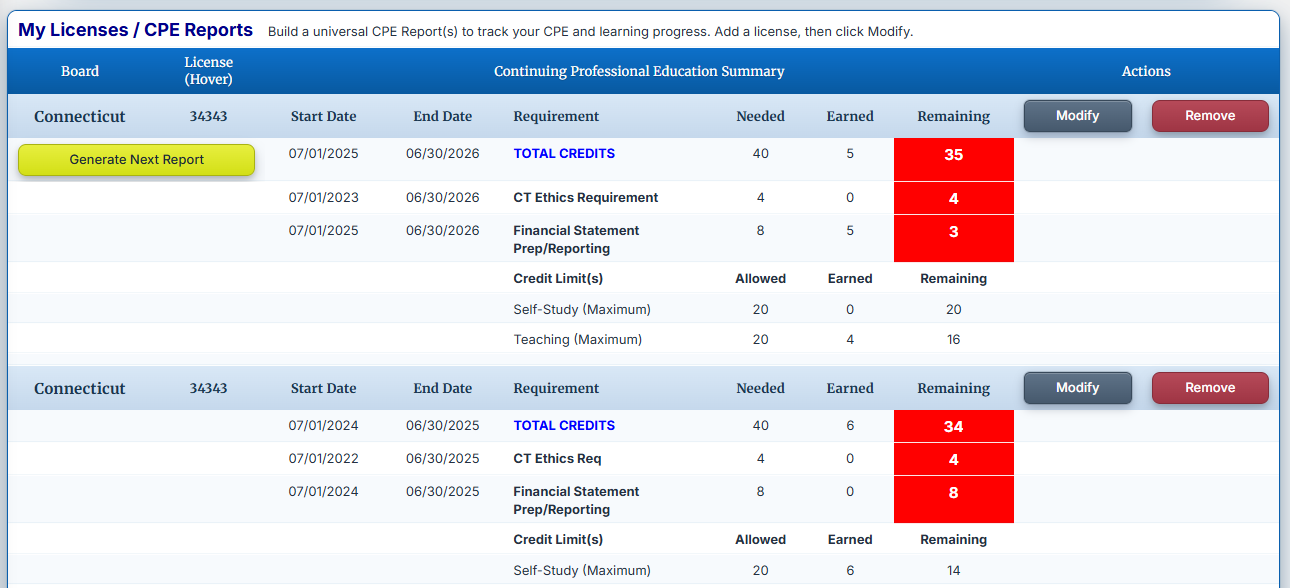
CPE123 Reports help you bring completed learning into a clear, organized view. Select the state and reporting period you want to review, then see how your recorded CPE applies to the requirements you are working to complete.
- Add state boards/regulators; set up your start, end, and reporting dates; set caps and restrictions.
- Generate new reports for subsequent CPE periods automatically.
- Create requirements and subrequirements.
- Courses taken from CPE123 are automatically added to your CPE Report(s). You can also add external courses for a more complete picture.
- Instantly know where you stand—green checkmarks mean you are in compliance; red checkmarks identify deficits.
CPE reports are designed to help you organize and monitor your learning. Your state board has final authority over the acceptance of individual courses and credits.